Grafana
Examples of panel grids, shared selectors, stat tiles, and chart configuration.
grafana.com , opens in a new tab Live demo , opens in a new tab
Patterns seen here 41
- Alert rule attached to panel
- Annotation
- Categorical series palette
- Dark-first data palette
- Data source badge
- Data table
- Delta indicator
- Drill-down
- Empty state
- Error and stale state
- Explain this metric
- Filter bar
- Freshness indicator
- Gauge and dial
- Geo map with markers
- Grayscale with alerts
- Header KPI strip
- Heatmap
- Histogram and distribution
- Host map
- KPI tile
- Legend and series toggle
- Loading and skeleton state
- Log tail
- Metric targets
- Panel grid
- Ranked list
- Semantic status color
- Sequential and diverging scales
- Service map
- Small multiples
- Sparkline
- Stacked composition
- Status history
- Target and progress
- Template variable
- Threshold line and region
- Time series
- Time-range picker
- Wallboard mode
- Zoom and pan on time
Captures
18 captures, newest first. Hover any box for the pattern and the note.
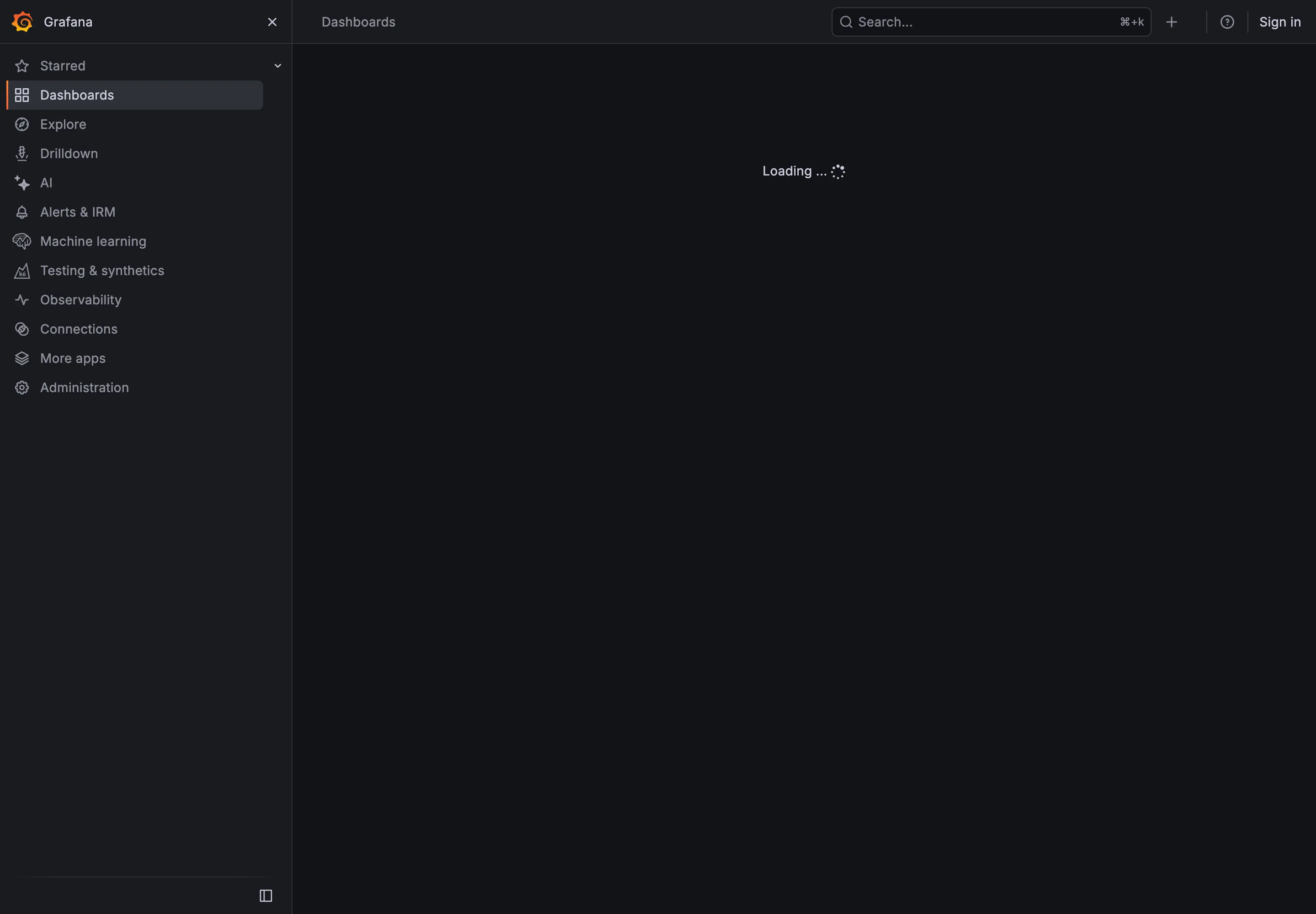
- Loading and skeleton state The loading message confirms that a request is in progress.
- Loading and skeleton state The content area does not reserve space for the rows that will appear.
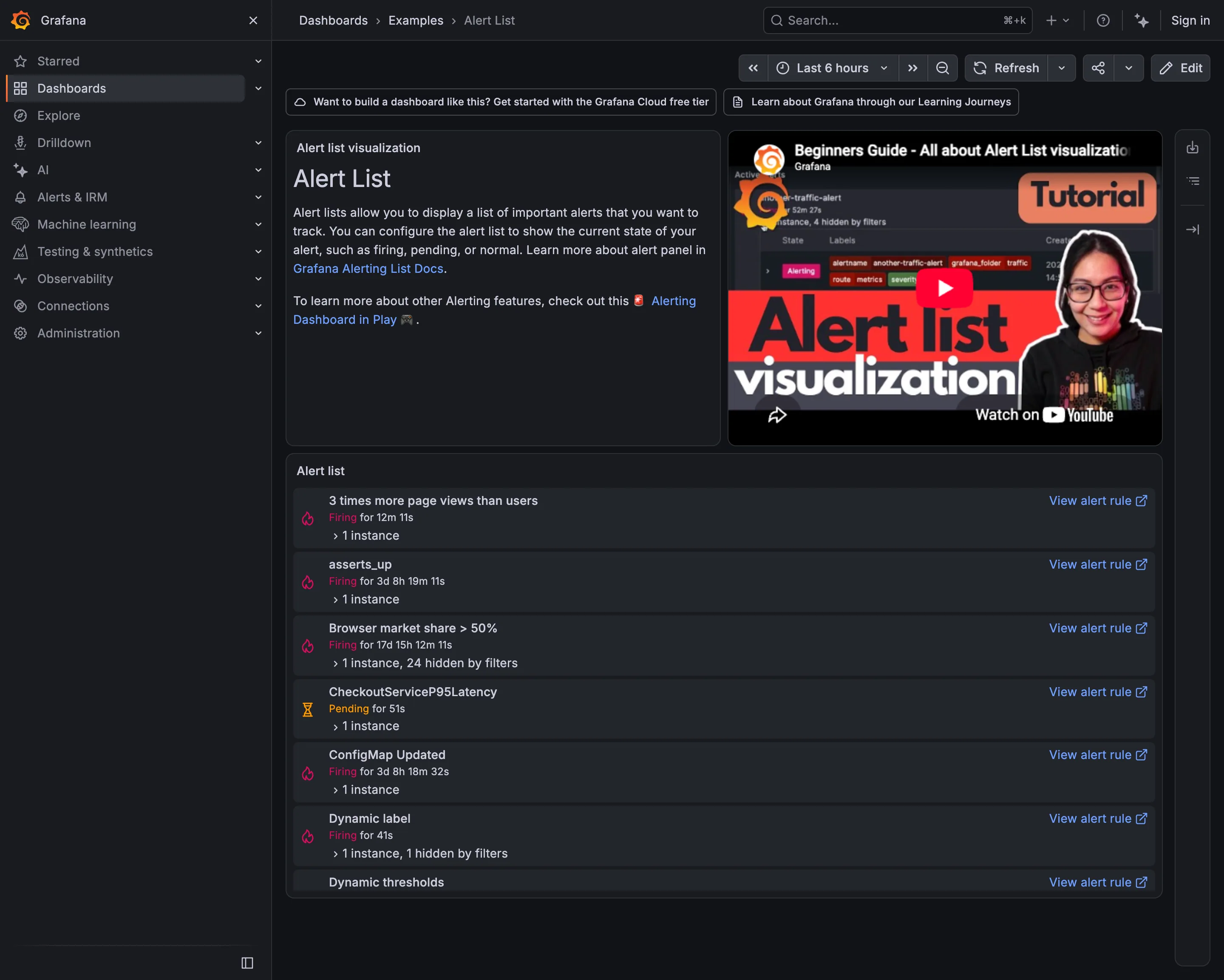
Alert rule attached to panel. Alert names use different conventions and do not consistently identify the affected system. Alert rule attached to panel. This alert has been firing for more than seventeen days. Semantic status color. Pending is labeled separately from firing. Drill-down. Each row links back to the alert rule. Filter bar. The row states how many instances are hidden by filters.
- Alert rule attached to panel Alert names use different conventions and do not consistently identify the affected system.
- Alert rule attached to panel This alert has been firing for more than seventeen days.
- Semantic status color Pending is labeled separately from firing.
- Filter bar The row states how many instances are hidden by filters.
- Drill-down Each row links back to the alert rule.
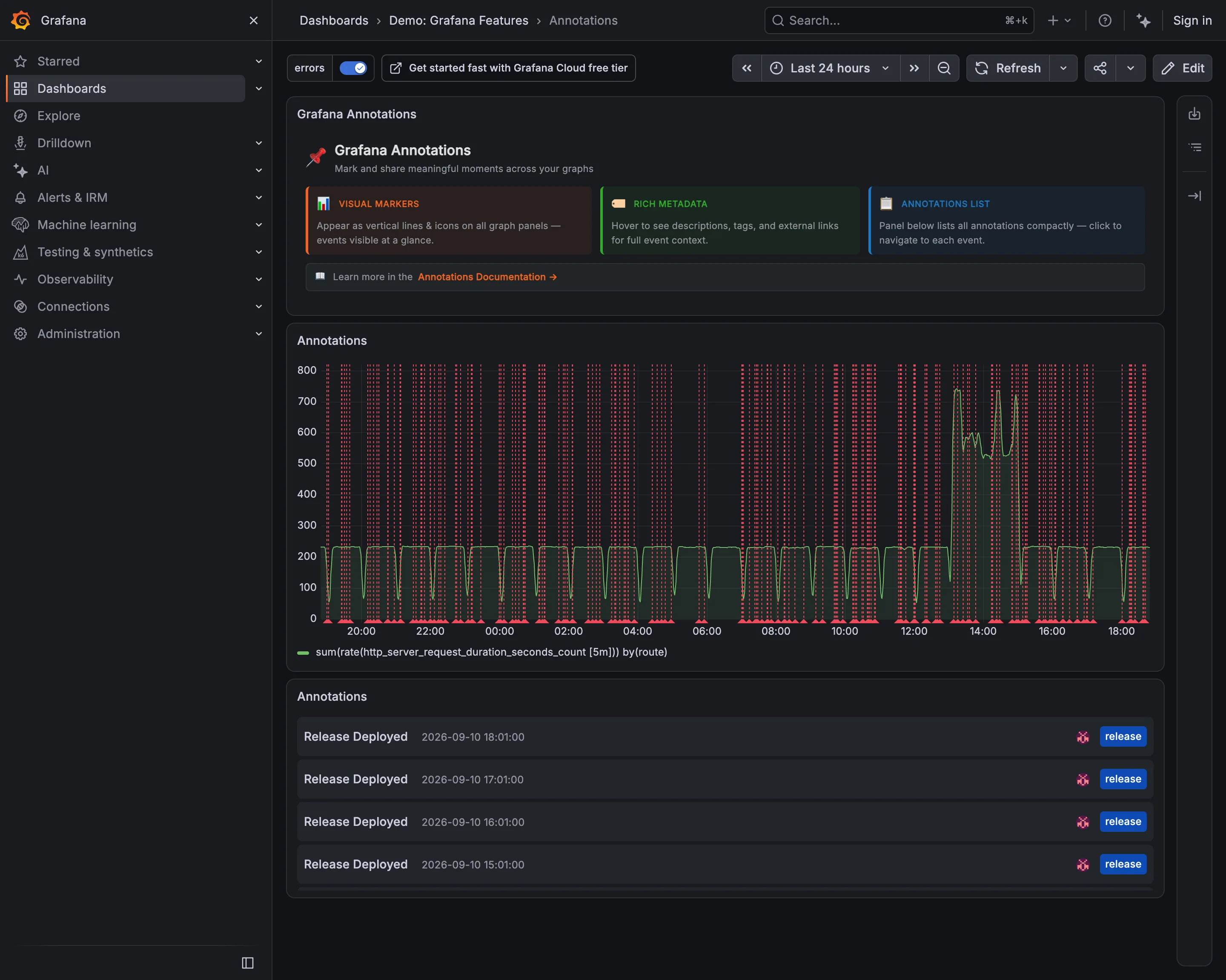
- Annotation Frequent event markers compete with the request-rate line.
- Annotation The event list provides readable timestamps and tags.
- Filter bar A tag filter is already applied to the annotations.
- Time-range picker The selected twenty-four-hour range affects how densely markers appear.
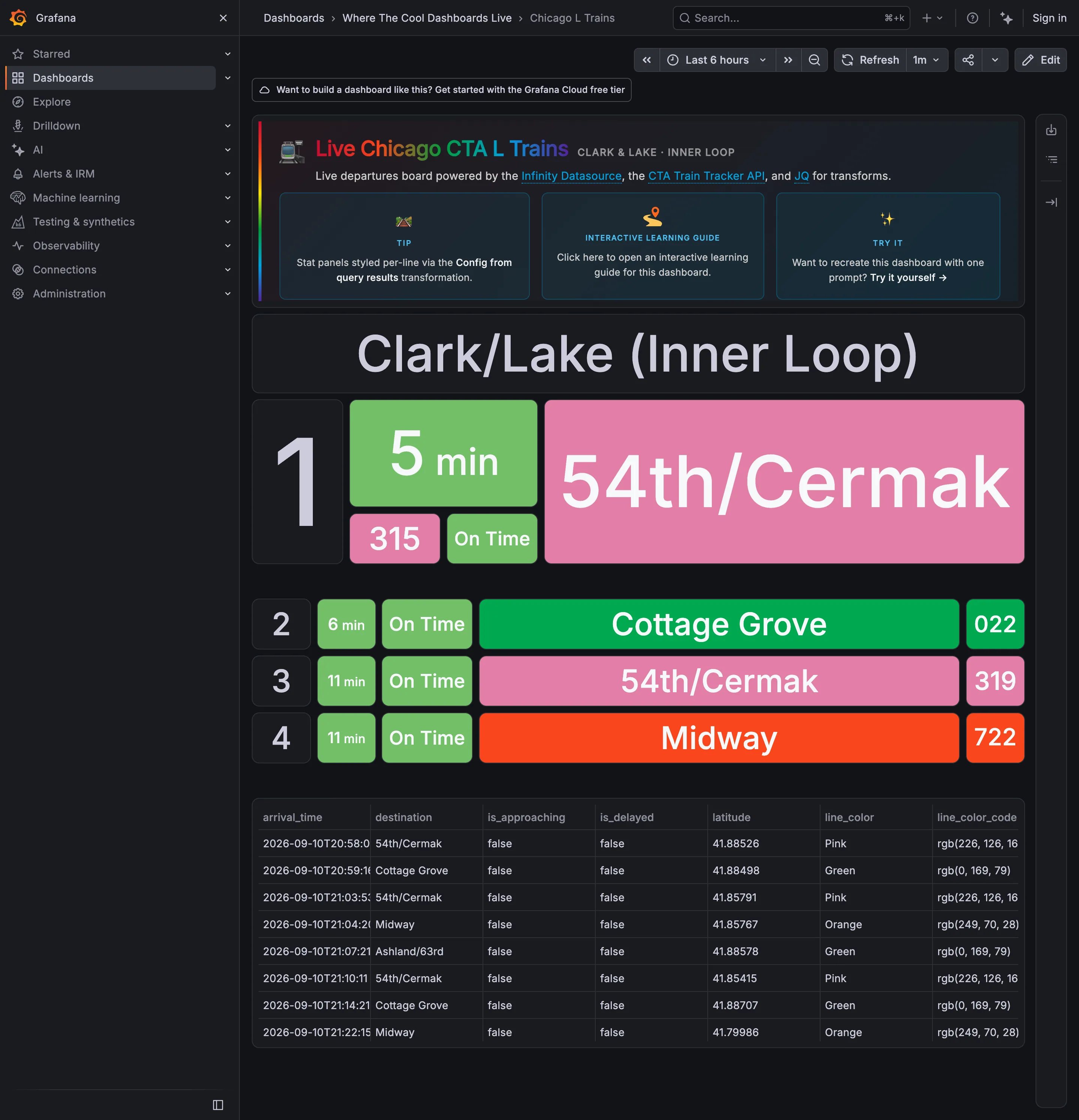
Data table. The raw feed includes the color value for each route. Wallboard mode. The next departure receives the largest text and panel. Panel grid. Later departures use smaller rows, making their lower priority visible. Freshness indicator. A countdown shows time until arrival but does not state the feed’s age. Semantic status color. Green identifies both a route and an on-time status; the words distinguish the meanings.
- Wallboard mode The next departure receives the largest text and panel.
- Panel grid Later departures use smaller rows, making their lower priority visible.
- Semantic status color Green identifies both a route and an on-time status; the words distinguish the meanings.
- Freshness indicator A countdown shows time until arrival but does not state the feed’s age.
- Data table The raw feed includes the color value for each route.
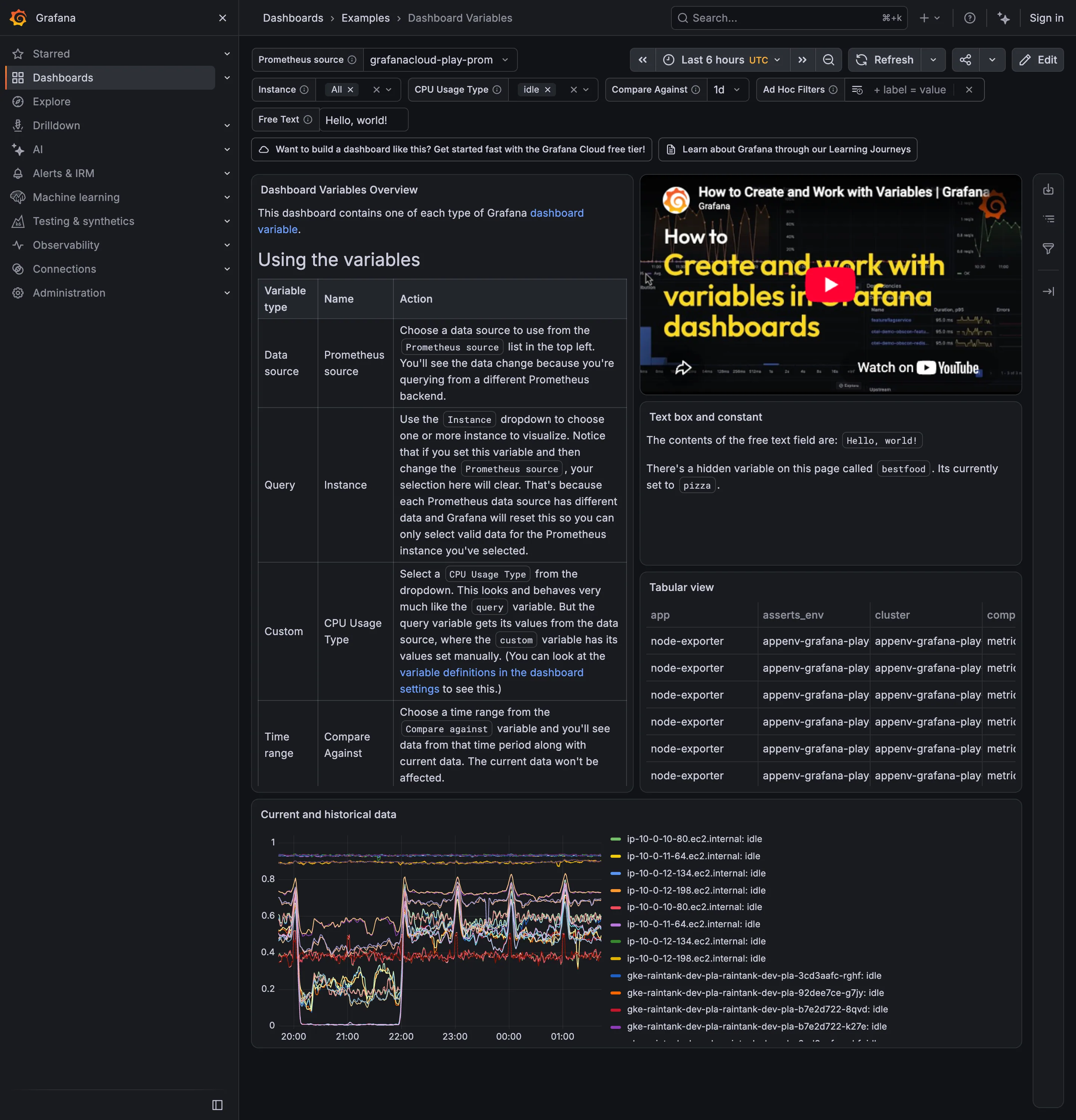
Categorical series palette. Similar hostnames and many colors make series matching difficult. Data table. A narrow table column truncates its content. Template variable. Selectors provide values used by panel queries and shared in the URL. Explain this metric. A text panel explains a hidden variable and its current value. Filter bar. Selected values appear as removable chips.
- Template variable Selectors provide values used by panel queries and shared in the URL.
- Filter bar Selected values appear as removable chips.
- Explain this metric A text panel explains a hidden variable and its current value.
- Categorical series palette Similar hostnames and many colors make series matching difficult.
- Data table A narrow table column truncates its content.
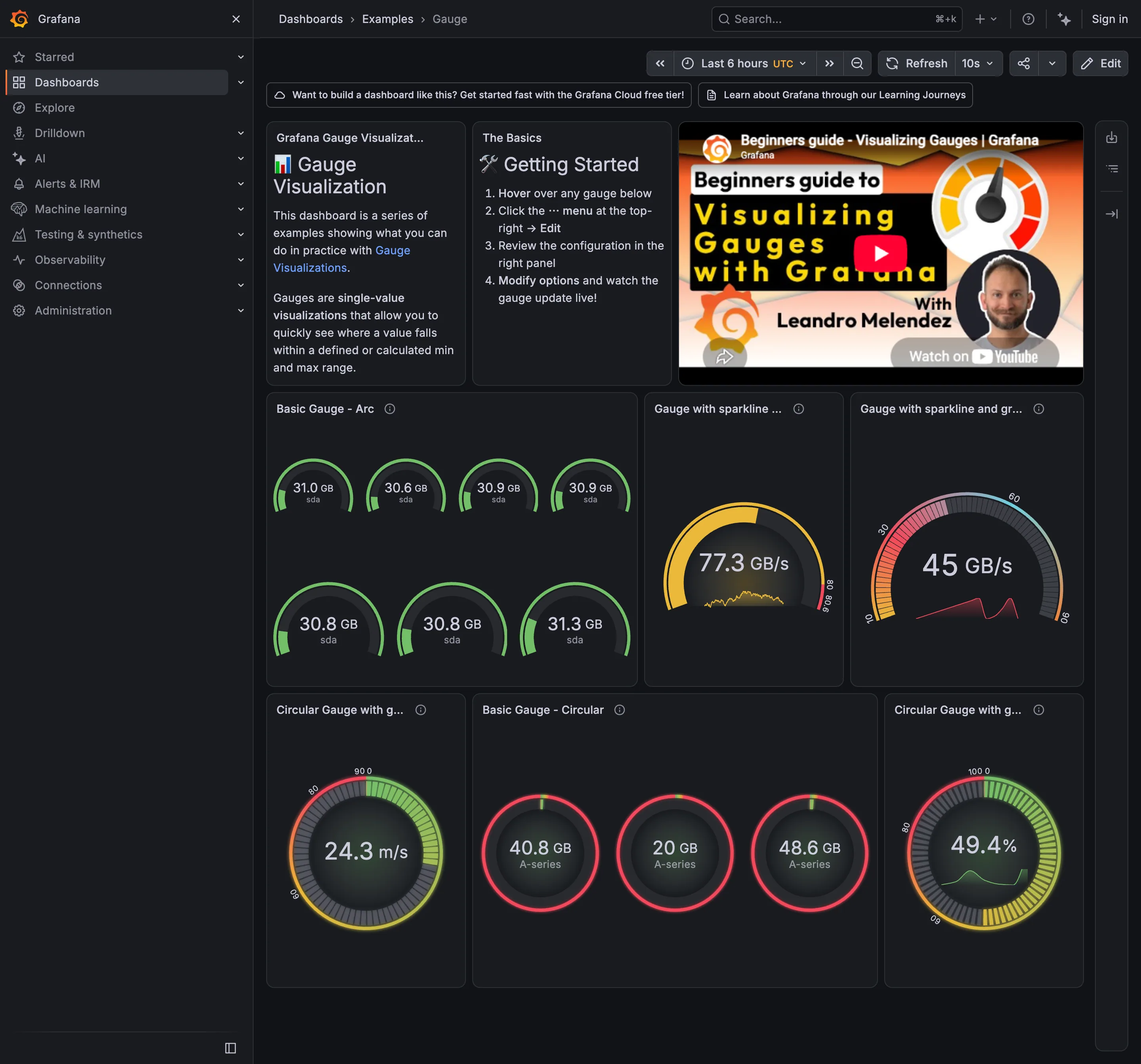
Semantic status color. Different values receive the same red treatment; the threshold needs explanation. Gauge and dial. Several similar disk values each occupy a separate gauge. Sequential and diverging scales. The multicolor ramp needs its labels to explain the value order. Sparkline. A sparkline adds history inside the gauge. Threshold line and region. A colored rim displays threshold regions.
- Gauge and dial Several similar disk values each occupy a separate gauge.
- Sparkline A sparkline adds history inside the gauge.
- Sequential and diverging scales The multicolor ramp needs its labels to explain the value order.
- Semantic status color Different values receive the same red treatment; the threshold needs explanation.
- Threshold line and region A colored rim displays threshold regions.
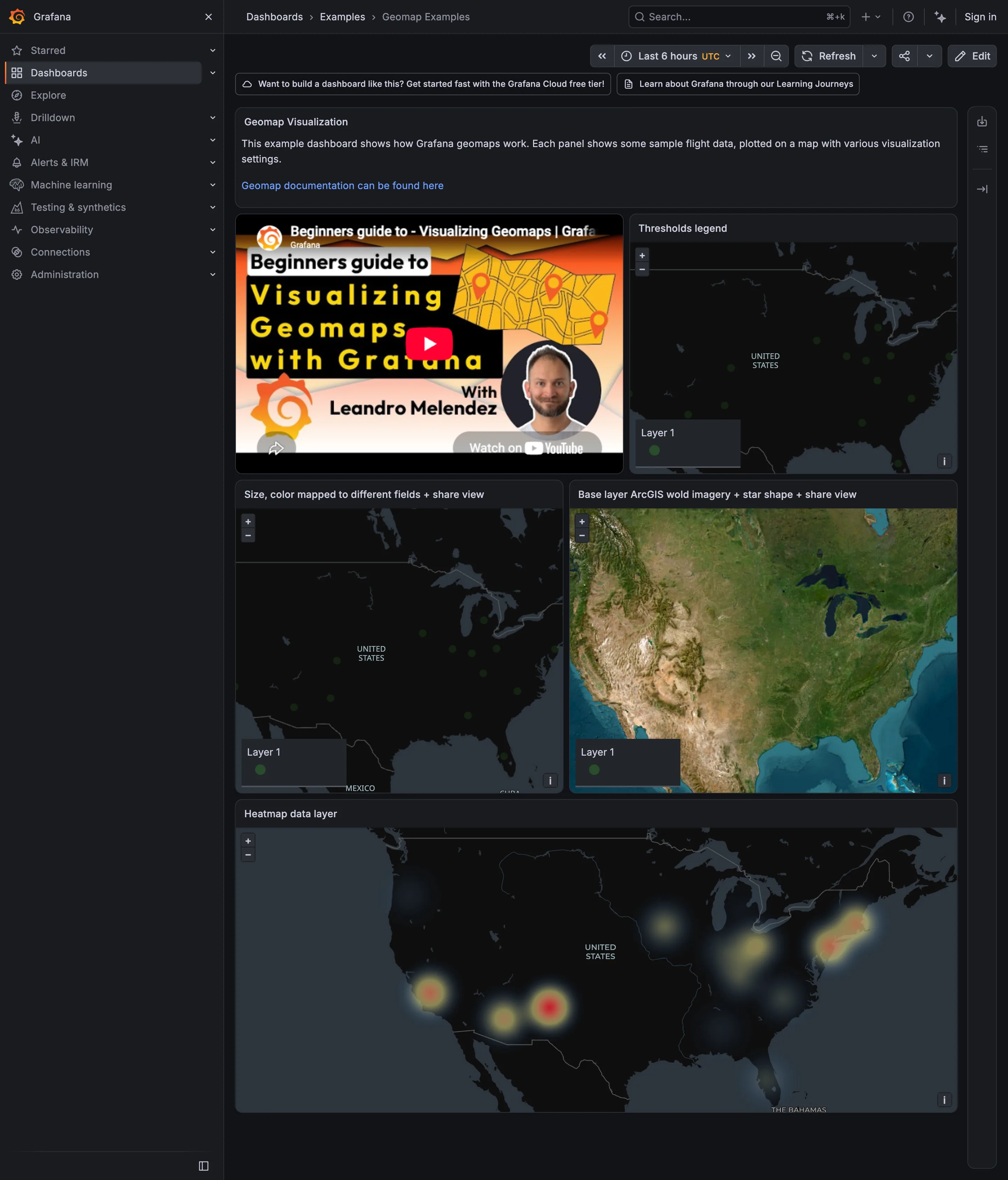
Sequential and diverging scales. The density layer groups nearby points; its radius affects the visible clusters. Geo map with markers. Satellite colors compete with the markers. Legend and series toggle. Layer 1 names the layer without explaining its data. Geo map with markers. Small green markers are difficult to distinguish on the dark background.
- Geo map with markers Small green markers are difficult to distinguish on the dark background.
- Geo map with markers Satellite colors compete with the markers.
- Sequential and diverging scales The density layer groups nearby points; its radius affects the visible clusters.
- Legend and series toggle Layer 1 names the layer without explaining its data.
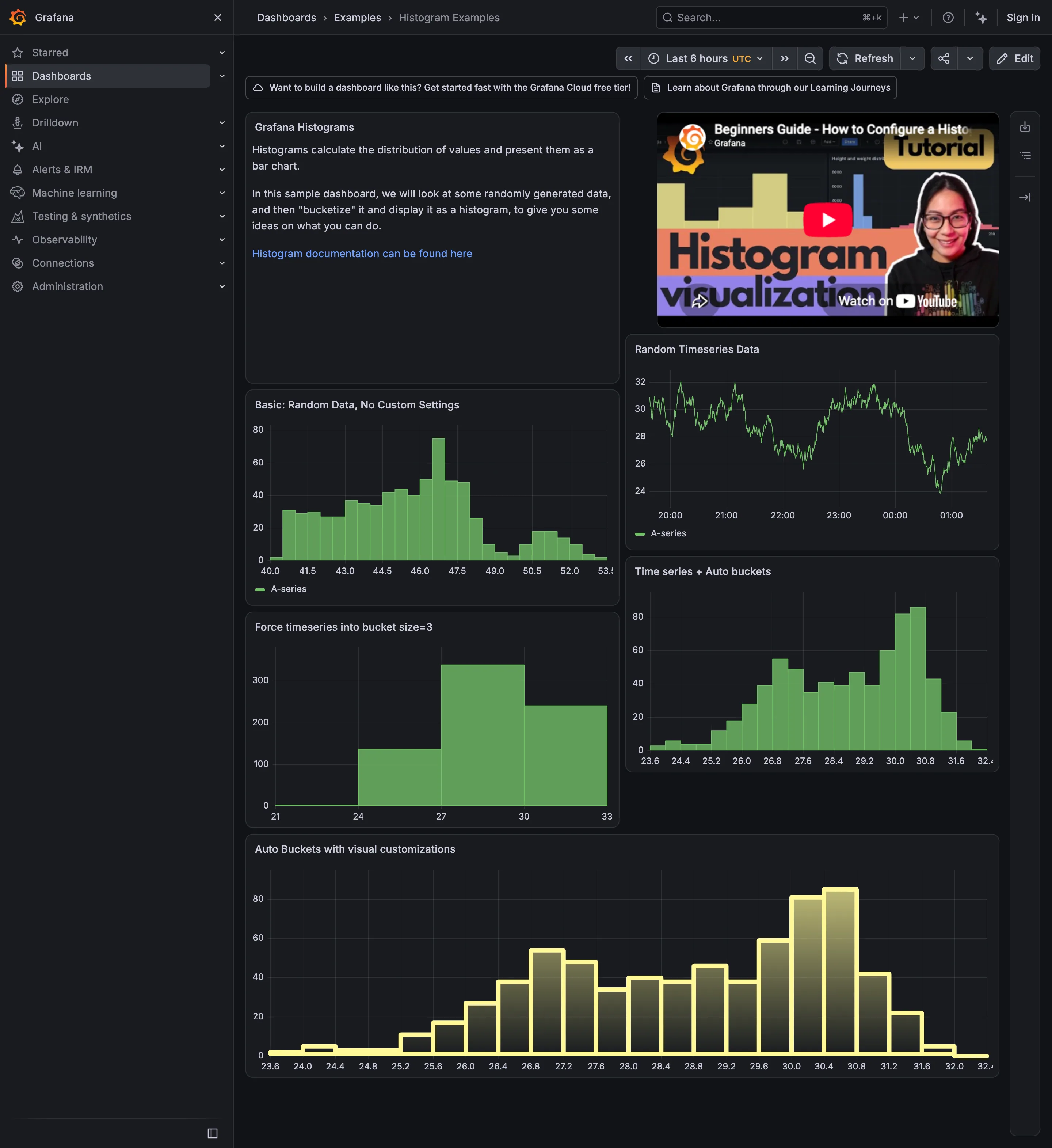
Sequential and diverging scales. The gradient adds decoration; bar height already shows the count. Time series. The source series shows the values before they are grouped into intervals. Histogram and distribution. Automatic intervals reveal two peaks near 27 and 30.4. Histogram and distribution. Wider intervals reduce the same data to four bars and obscure the separate peaks. Histogram and distribution. Another distribution shows a long shoulder and a smaller second peak.
- Time series The source series shows the values before they are grouped into intervals.
- Histogram and distribution Automatic intervals reveal two peaks near 27 and 30.4.
- Histogram and distribution Wider intervals reduce the same data to four bars and obscure the separate peaks.
- Histogram and distribution Another distribution shows a long shoulder and a smaller second peak.
- Sequential and diverging scales The gradient adds decoration; bar height already shows the count.
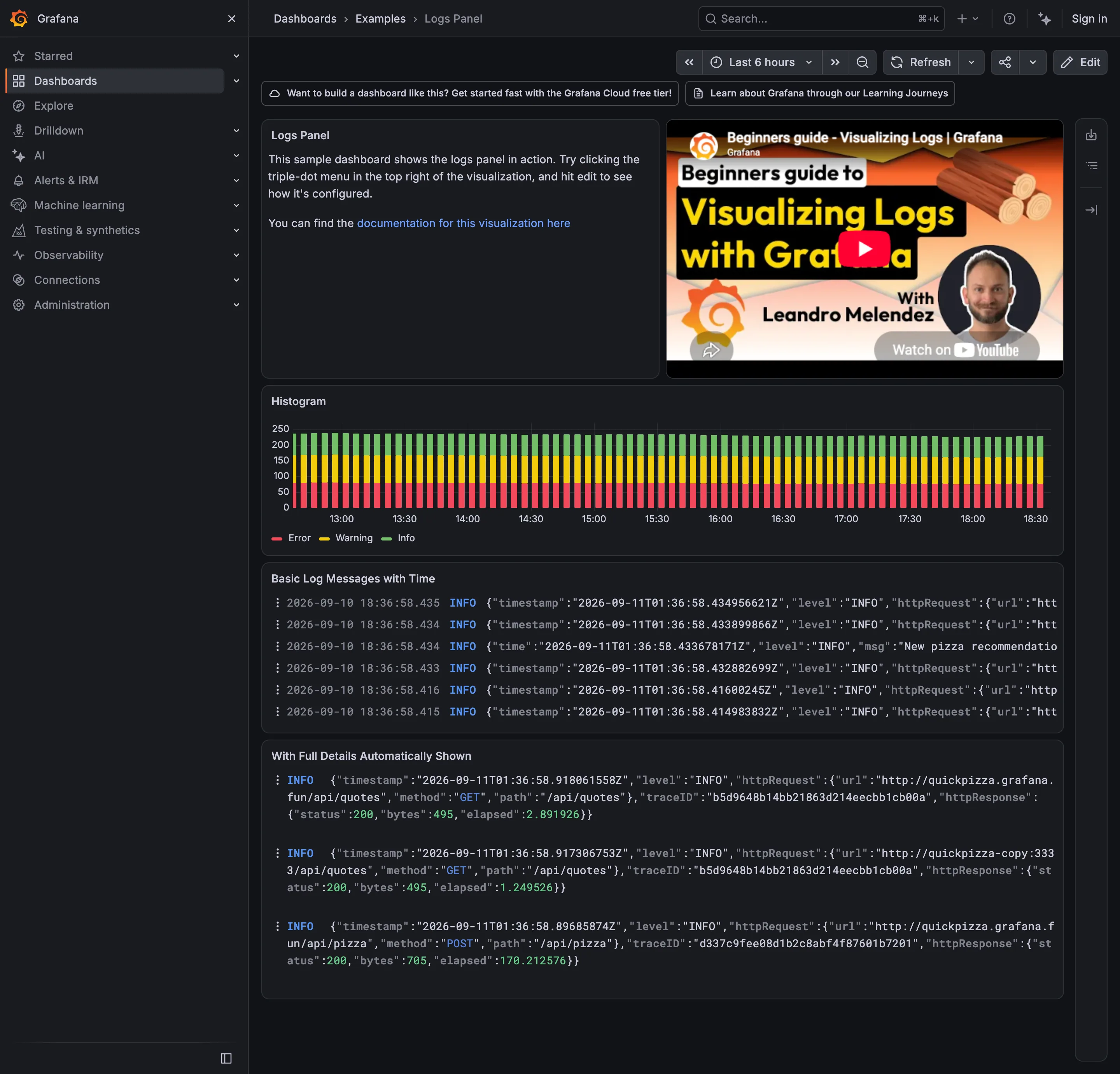
- Stacked composition Stacked log counts show volume by level over time.
- Log tail Log rows are truncated and contain timestamps in two timezones.
- Drill-down The trace ID connects the log event to its request.
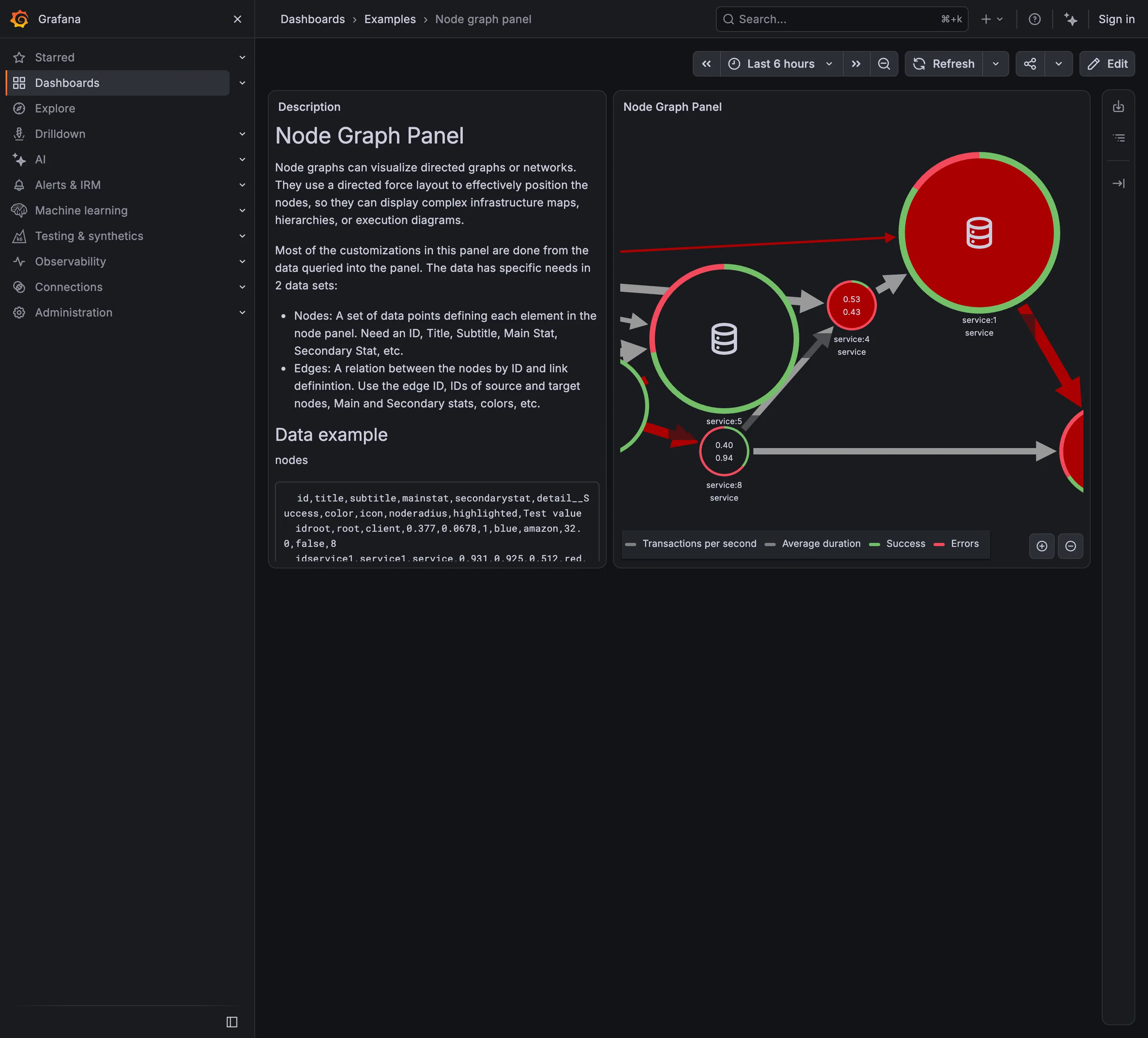
Service map. Nodes represent services and lines represent their connections. Semantic status color. Each node combines two values with a success/error ring. Legend and series toggle. The legend explains the measures shown inside and around nodes. Zoom and pan on time. Zoom controls help reveal nodes outside the visible panel.
- Service map Nodes represent services and lines represent their connections.
- Semantic status color Each node combines two values with a success/error ring.
- Legend and series toggle The legend explains the measures shown inside and around nodes.
- Zoom and pan on time Zoom controls help reveal nodes outside the visible panel.
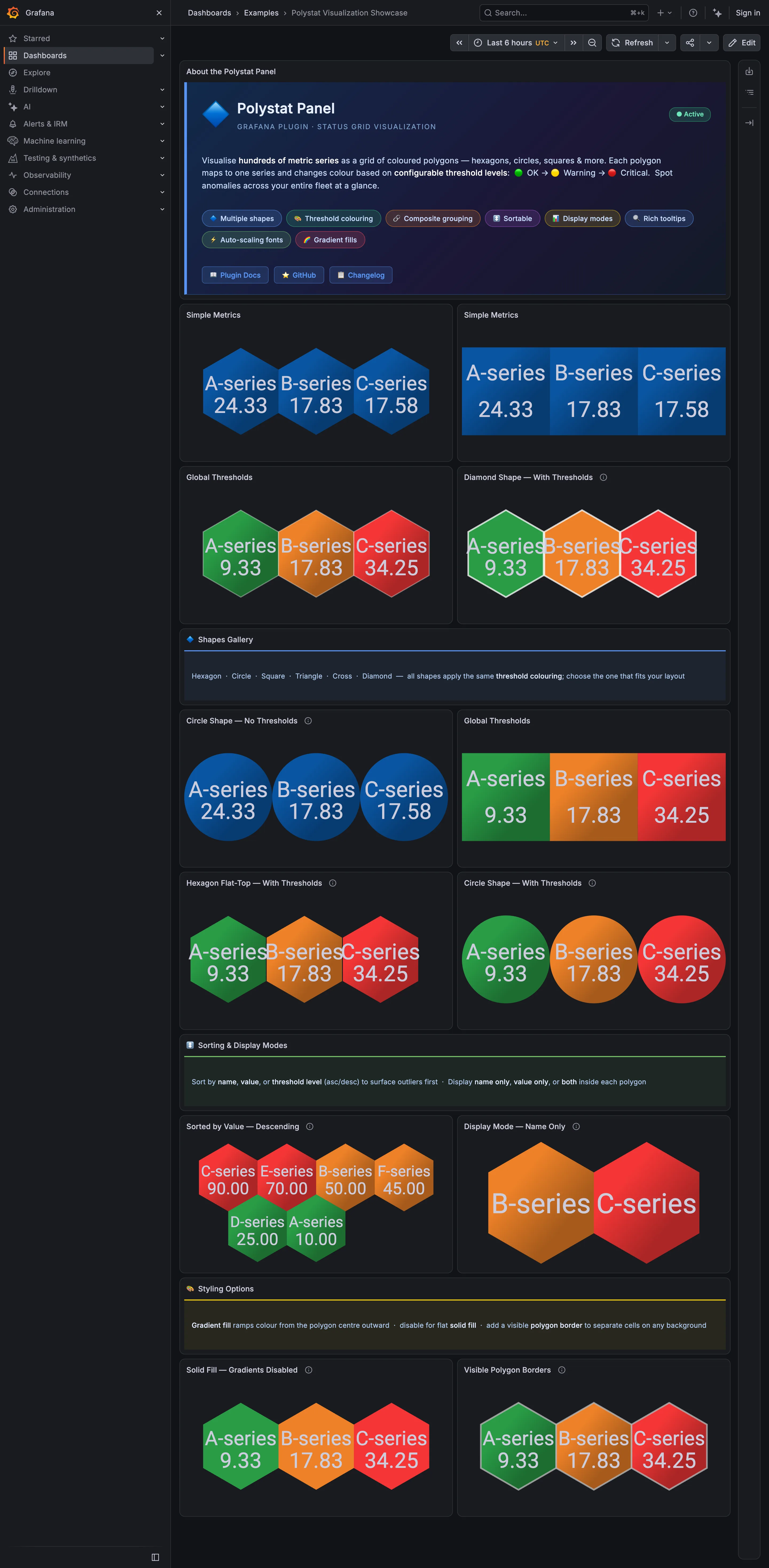
Host map. Touching hexagons make adjacent cells read as a group. Host map. Circles leave gaps between neighboring cells. Semantic status color. Cell fills represent OK, warning, and critical states. Ranked list. Descending order brings the highest values first. KPI tile. Label-only cells show a name and color without a numeric value.
- Host map Touching hexagons make adjacent cells read as a group.
- Host map Circles leave gaps between neighboring cells.
- Semantic status color Cell fills represent OK, warning, and critical states.
- Ranked list Descending order brings the highest values first.
- KPI tile Label-only cells show a name and color without a numeric value.
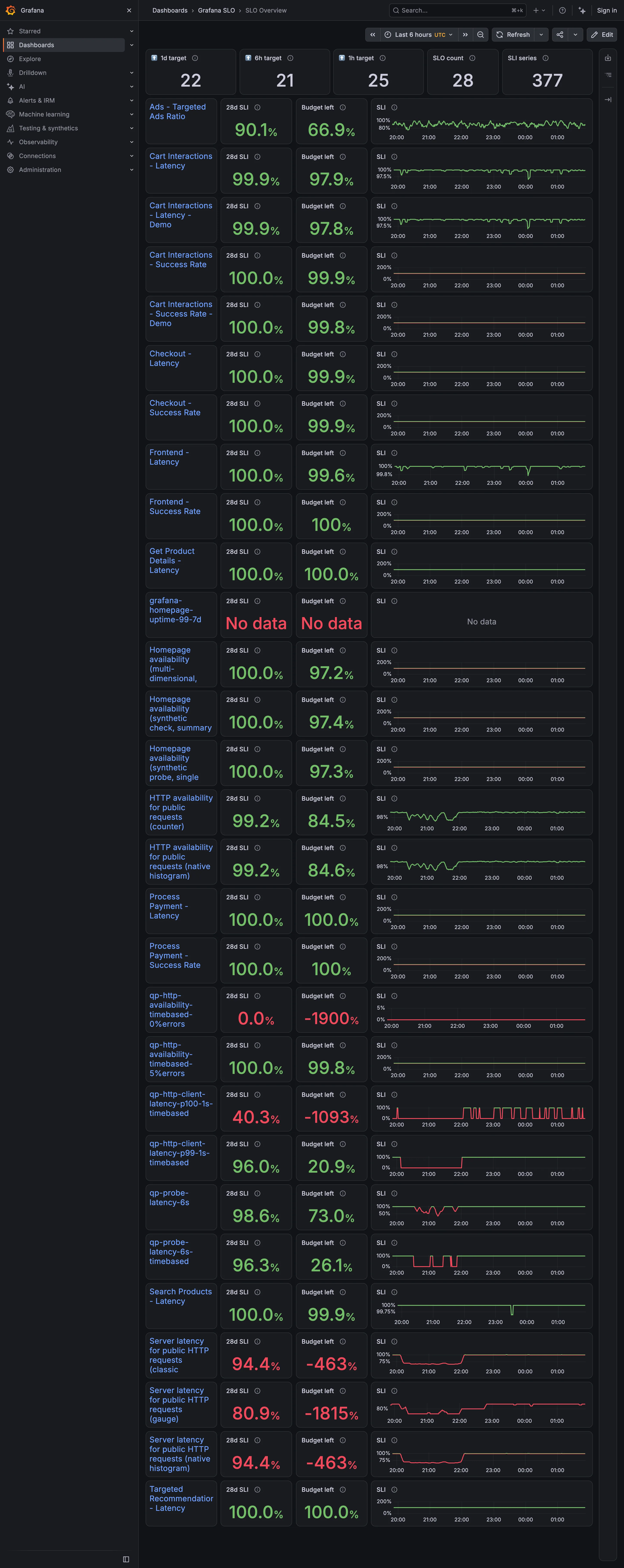
Small multiples. Sparkline scales differ between rows, limiting direct comparison. Metric targets. The budget column adds context to each objective’s result. Error and stale state. No data uses the same red treatment as a breach. Target and progress. Large negative budget values need a clear explanation of the calculation. Header KPI strip. The top tiles count targets, objectives, and series rather than showing whether goals are met.
- Metric targets The budget column adds context to each objective’s result.
- Target and progress Large negative budget values need a clear explanation of the calculation.
- Error and stale state No data uses the same red treatment as a breach.
- Small multiples Sparkline scales differ between rows, limiting direct comparison.
- Header KPI strip The top tiles count targets, objectives, and series rather than showing whether goals are met.
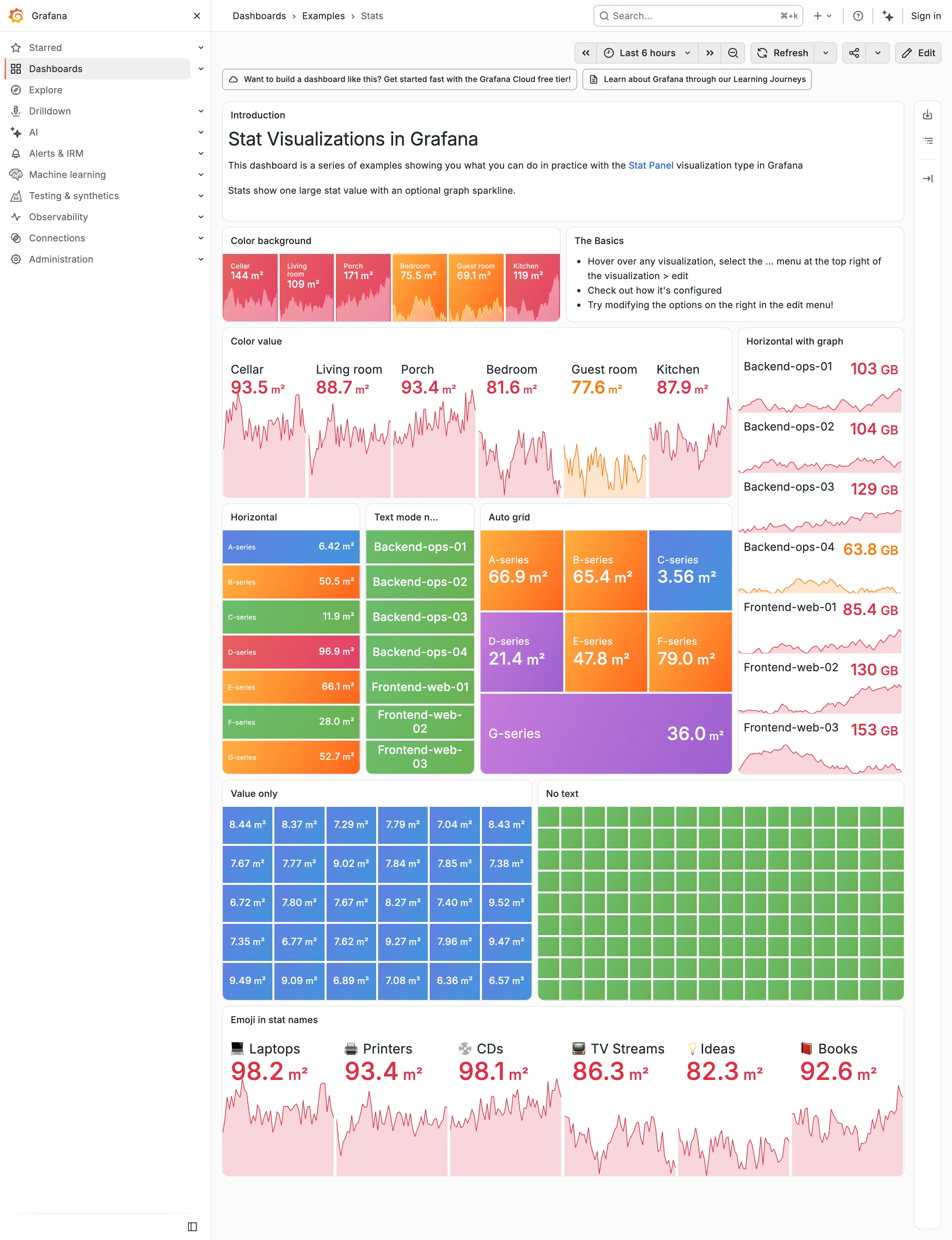
Sparkline. Faint area fills are harder to distinguish on the light background. Dark-first data palette. Value colors that stand out on dark backgrounds appear pale on white. Grayscale with alerts. Unlabeled green cells remain difficult to interpret in either theme. Dark-first data palette. The orange value has limited visual contrast against white. Semantic status color. Whole-tile fills keep the text on a colored background.
- Dark-first data palette Value colors that stand out on dark backgrounds appear pale on white.
- Dark-first data palette The orange value has limited visual contrast against white.
- Semantic status color Whole-tile fills keep the text on a colored background.
- Grayscale with alerts Unlabeled green cells remain difficult to interpret in either theme.
- Sparkline Faint area fills are harder to distinguish on the light background.
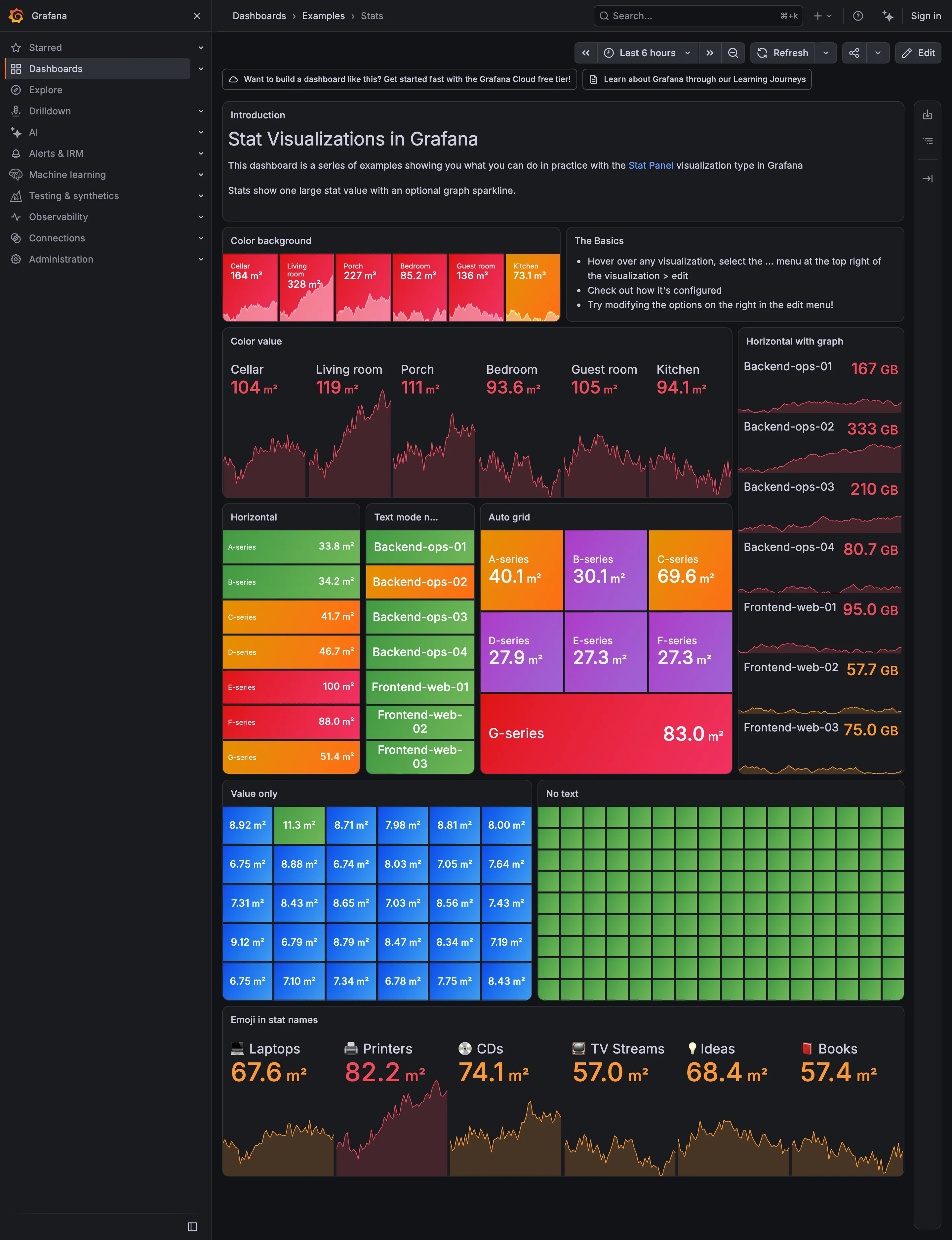
Header KPI strip. Consistent label and value positions make the tile row easier to scan. KPI tile. A label, value, unit, and sparkline appear without an explicit comparison. Dark-first data palette. The dark theme makes these value colors more prominent than in the light capture. Semantic status color. The cells have no text, leaving color as the only visible cue. Sparkline. Sparklines use individual scales, so row-to-row comparison needs care. KPI tile. Values appear without labels explaining what they measure. Grayscale with alerts. Multiple strong colors compete for attention. Semantic status color. Whole-tile color strongly emphasizes every value in this group.
- KPI tile A label, value, unit, and sparkline appear without an explicit comparison.
- Dark-first data palette The dark theme makes these value colors more prominent than in the light capture.
- Sparkline Sparklines use individual scales, so row-to-row comparison needs care.
- Semantic status color Whole-tile color strongly emphasizes every value in this group.
- Grayscale with alerts Multiple strong colors compete for attention.
- KPI tile Values appear without labels explaining what they measure.
- Semantic status color The cells have no text, leaving color as the only visible cue.
- Header KPI strip Consistent label and value positions make the tile row easier to scan.
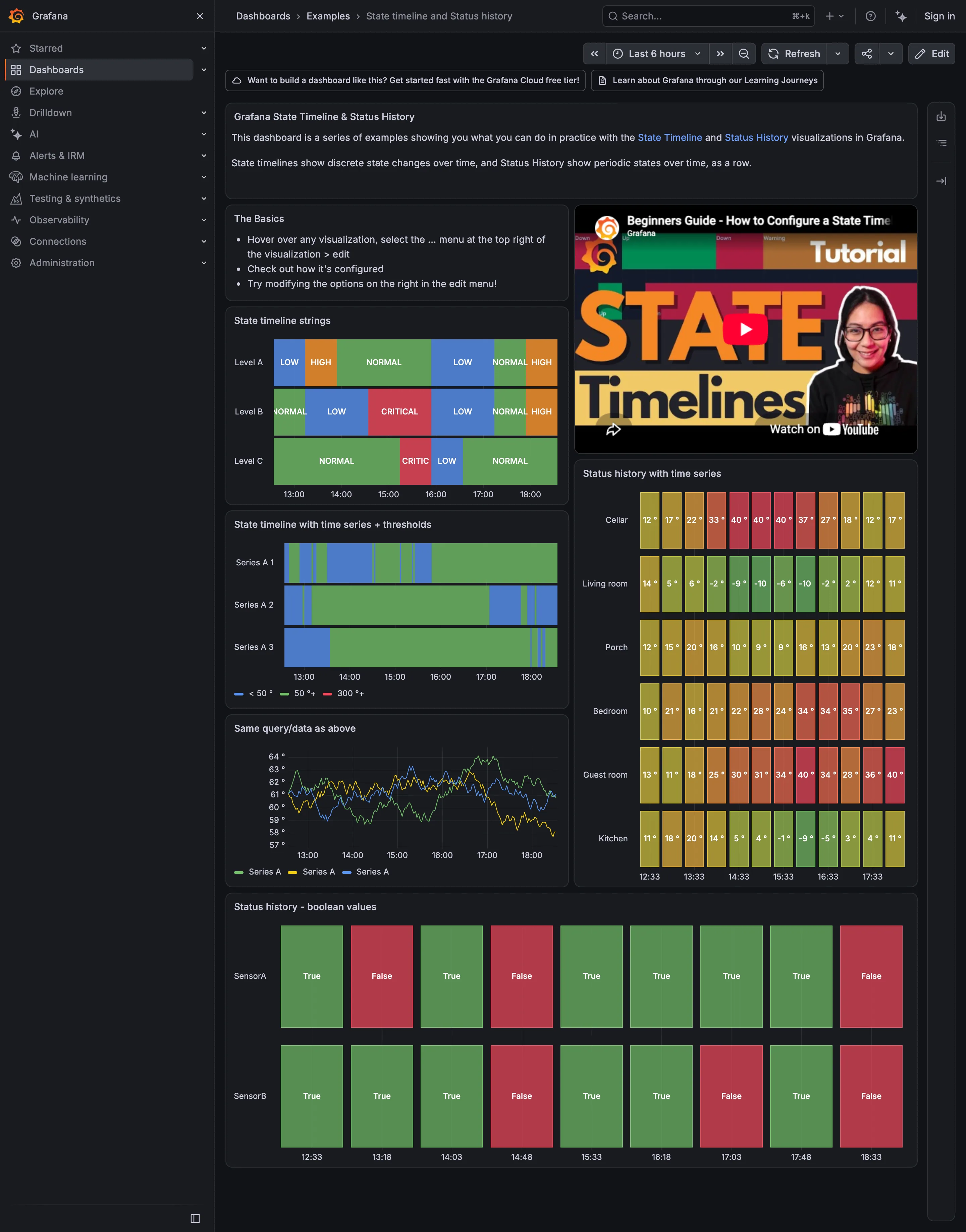
Semantic status color. Both states have text labels as well as colors. Sequential and diverging scales. Separate sample marks use color for temperature rather than health. Status history. State names appear inside continuous time regions. Threshold line and region. Thresholds convert numeric values into named bands. Time series. The line chart preserves the numeric values behind the state view.
- Status history State names appear inside continuous time regions.
- Threshold line and region Thresholds convert numeric values into named bands.
- Time series The line chart preserves the numeric values behind the state view.
- Sequential and diverging scales Separate sample marks use color for temperature rather than health.
- Semantic status color Both states have text labels as well as colors.
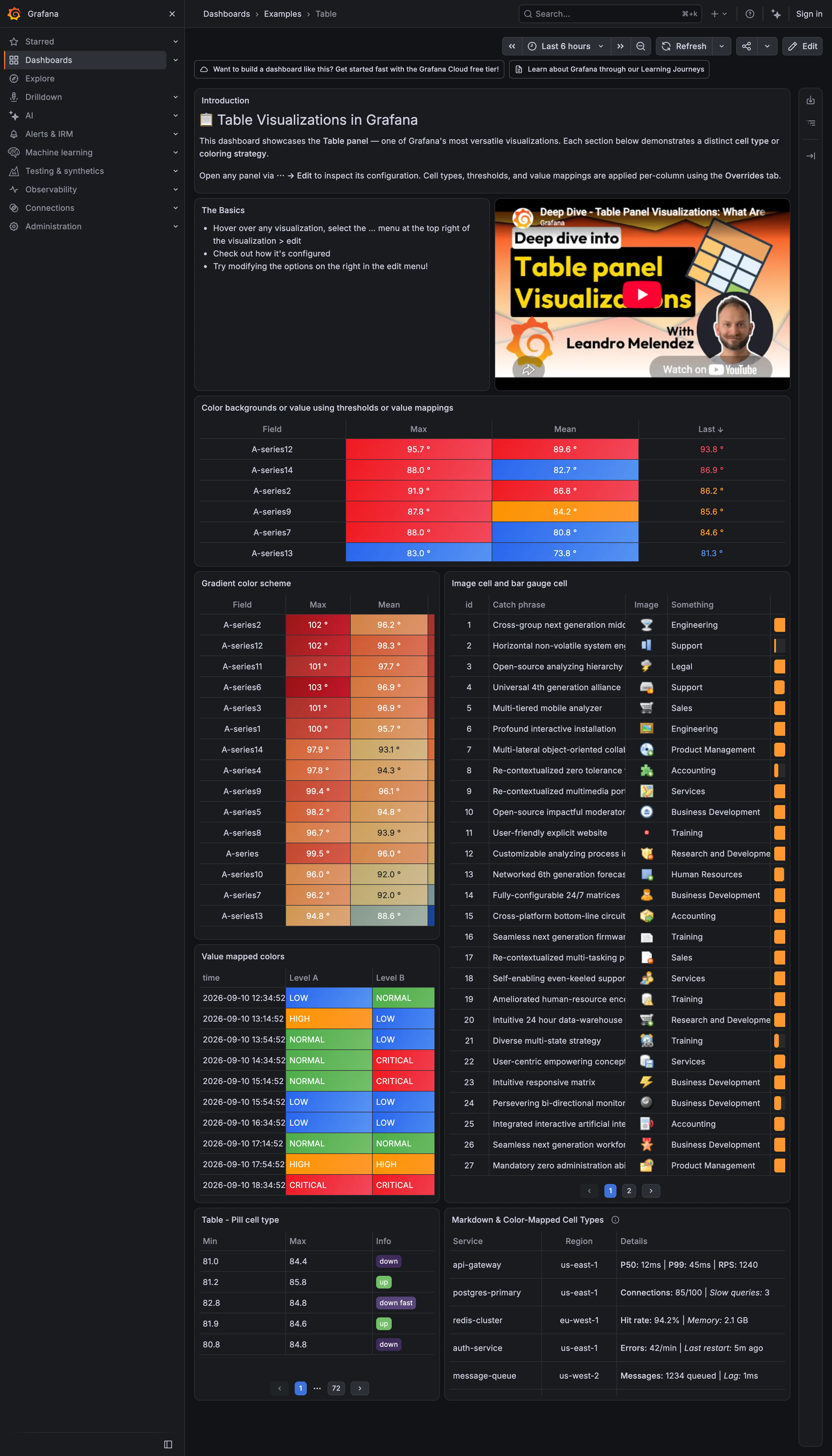
Data table. Narrow columns squeeze the bar and truncate text. Data table. Threshold colors help people scan the column for states. Sequential and diverging scales. A continuous color scale highlights differences down the column. Semantic status color. Value mappings pair named states with their colors. Delta indicator. Direction labels appear in a paginated table without a comparison amount.
- Data table Threshold colors help people scan the column for states.
- Sequential and diverging scales A continuous color scale highlights differences down the column.
- Data table Narrow columns squeeze the bar and truncate text.
- Semantic status color Value mappings pair named states with their colors.
- Delta indicator Direction labels appear in a paginated table without a comparison amount.
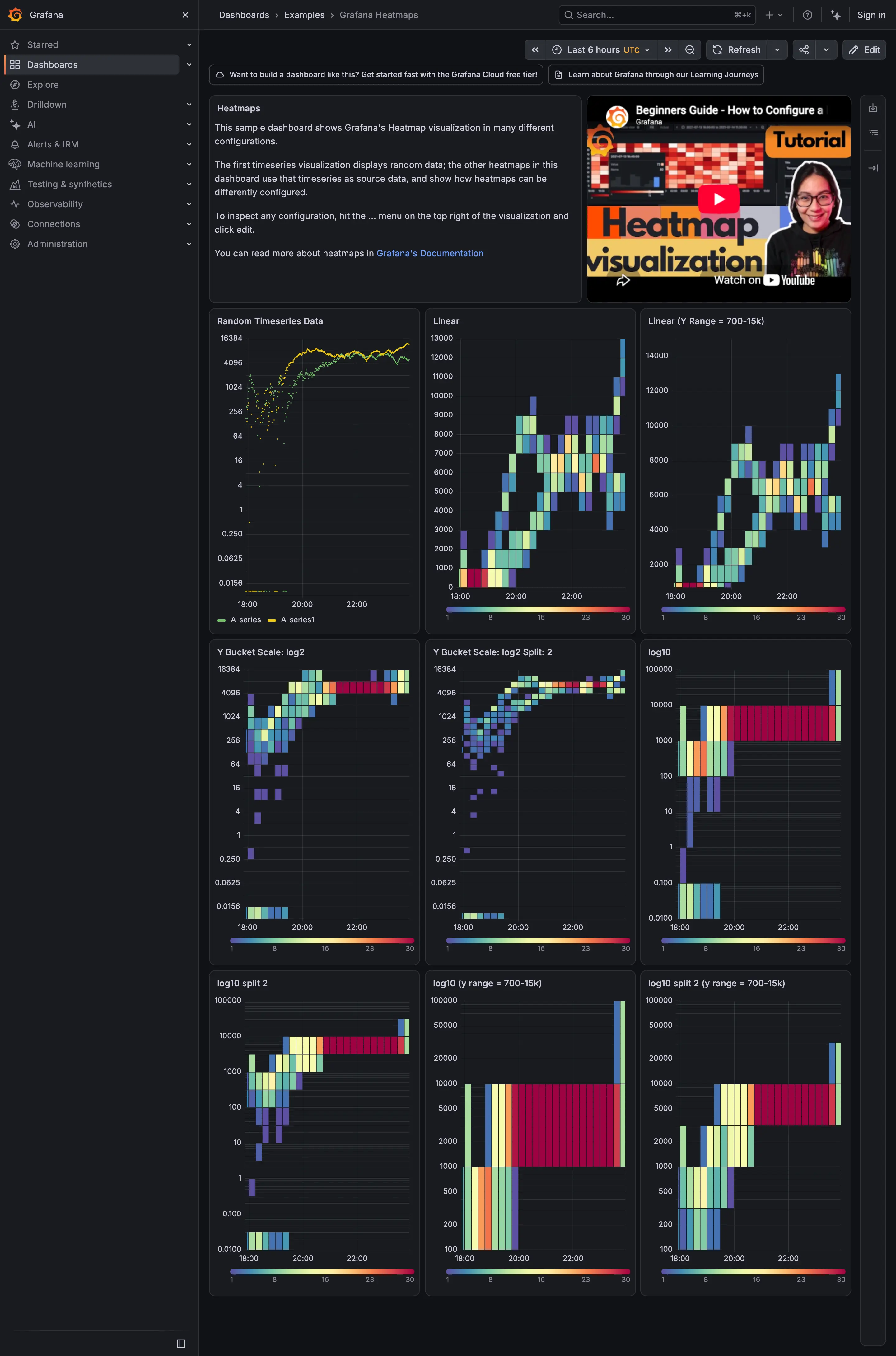
Small multiples. Repeated panels make the effects of different settings easier to compare. Time series. The source series supplies the data for the heatmaps. Heatmap. Linear value intervals concentrate much of this distribution near the bottom. Sequential and diverging scales. Each heatmap has its own legend; check the ranges before comparing colors.
- Time series The source series supplies the data for the heatmaps.
- Heatmap Linear value intervals concentrate much of this distribution near the bottom.
- Small multiples Repeated panels make the effects of different settings easier to compare.
- Sequential and diverging scales Each heatmap has its own legend; check the ranges before comparing colors.
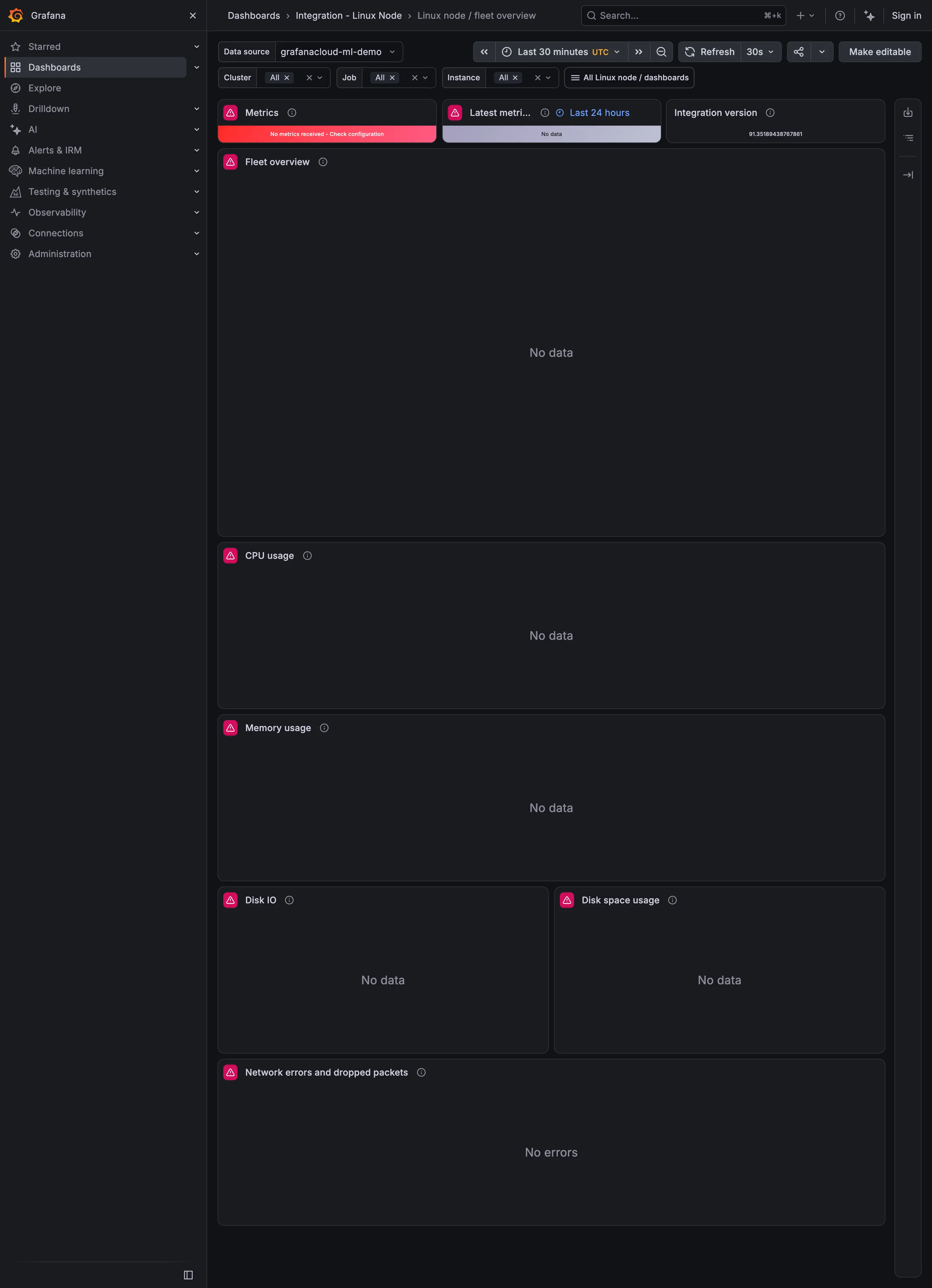
Empty state. The chart reports No data but gives little help with the cause. Header KPI strip. Status tiles sit above the charts. Error and stale state. The red tile reports missing metrics and suggests checking configuration. Freshness indicator. The freshness tile reports No data without an update time. Data source badge. The integration version remains available while measurements are missing.
- Header KPI strip Status tiles sit above the charts.
- Error and stale state The red tile reports missing metrics and suggests checking configuration.
- Freshness indicator The freshness tile reports No data without an update time.
- Data source badge The integration version remains available while measurements are missing.
- Empty state The chart reports No data but gives little help with the cause.